ubuntu-static-reports-operator: Ubuntu Static Reports Operator: The Charm That Turns Archive State Into Static Truth
A Juju operator for Canonical’s archive dashboards, using systemd timers, atomic file publishing, and static files to keep Ubuntu’s release metadata reliable without a heavy web stack.
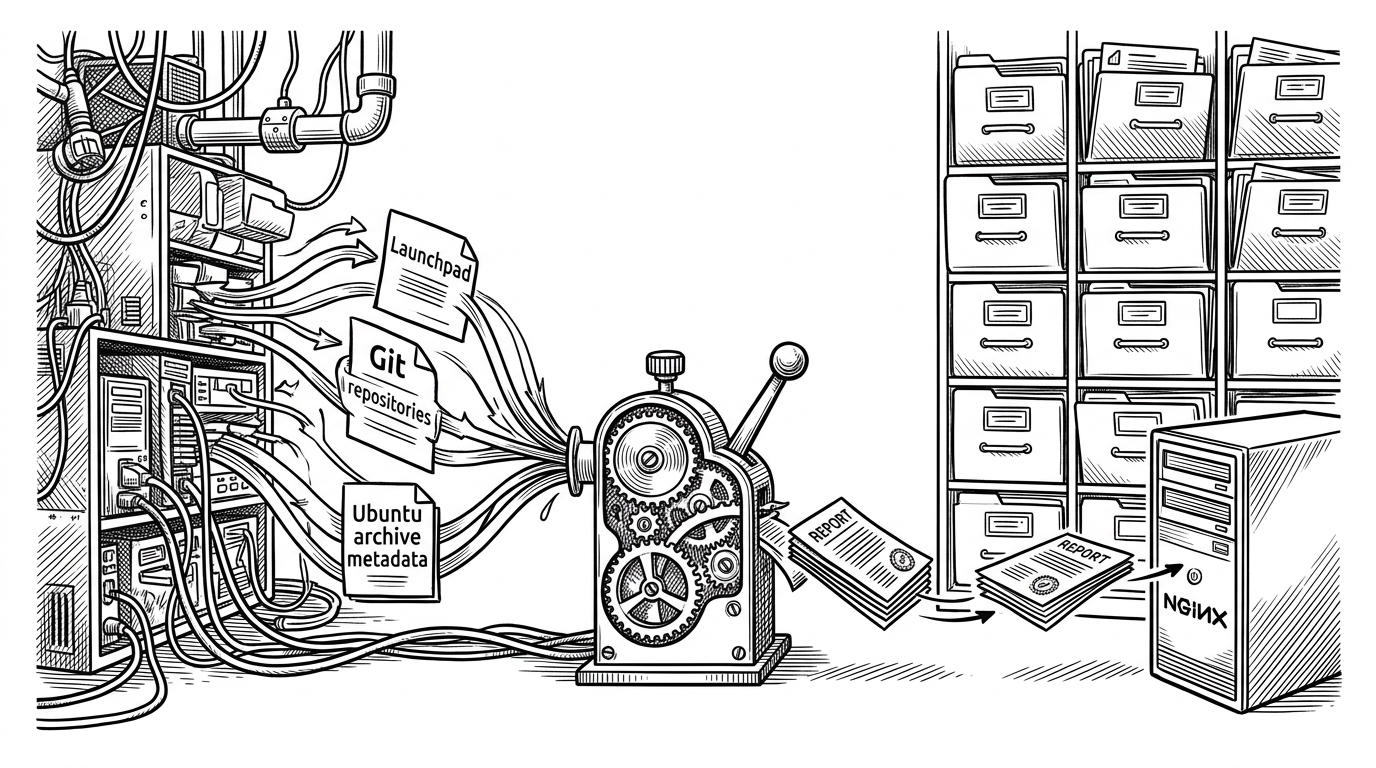
- This charm is less a web app than a report factory that compiles Ubuntu archive state into static files.
- The real scheduling engine is systemd, which keeps each report observable, durable, and independent of the charm process.
- Atomic file swaps let Nginx serve only complete reports, which is the small Unix detail that makes the whole setup trustworthy.
- Canonical is modernizing legacy archive workflows by wrapping old operational habits in a model-driven Juju operator.
Why Ubuntu’s archive dashboards should be static
The surprise in ubuntu-static-reports-operator is not that it serves pages. It is that it refuses to behave like a normal web app. The project gathers archive data on a schedule, renders it into static HTML and machine-readable files, and hands the result to Nginx. That trades request-time complexity for a much quieter operating model.
That matters because these reports are not decorative. They track the machinery behind Ubuntu releases: seeds, package sets, migration status, blocklists, and related archive metadata. The repo’s job is to keep those facts available without making the serving layer depend on live API calls every time a browser reloads.
Ubuntu Static Reports Operator is a charm for building and presenting various static reports for Ubuntu. Fetching those live from launchpad API or similar
What this charm actually manages
The charm is a control plane, not the worker. In src/charm.py and src/staticreports.py, it installs packages, creates directories, wires secrets, syncs supporting tools, and lays down systemd units. The reporting work itself lives elsewhere, mostly in shell scripts and service files.
# The charm’s shape, in plain terms
install:
  - apt packages
  - directories under /srv/staticreports/www
  - supporting tools and secrets
  - systemd units for each report

runtime:
  - timers trigger report jobs
  - jobs fetch and transform archive data
  - output is published as static files
  - Nginx serves the final path
The hidden engine is systemd, not Python
The repo leans on systemd timers instead of a custom scheduler. That choice is boring in the best possible way. Each report gets its own timer and service pair, which means administrators can inspect, restart, and reason about the pipeline with standard OS tools instead of digging through application code.
It also keeps failure domains small. If a report job breaks, it does not take down the whole system. If the charm is idle, the timers still exist. The charm sets the rules, while systemd keeps time.
| Approach | What schedules work | Operational trade-off |
|---|---|---|
| Legacy cron-style scripts | Cron entries or ad hoc scripts | Simple, but harder to observe and manage at scale |
| Generic app server | An application process at request time | Flexible, but it introduces live dependencies and runtime fragility |
| Ubuntu Static Reports Operator | systemd timers and services | Small surface area, OS-native observability, and durable scheduled jobs |
How Ubuntu reports become atomic files
The safest detail in the repo is also the quietest. When a script updates a report, it writes to a temporary .new path first, then swaps that file into place with mv. That means Nginx never sees a half-written report, even if the job is interrupted midway.
cp -a "$datafile" "${destination}.new"
mv "${destination}.new" "${destination}"
The charm’s real job is coordination
The cleanest way to read the repo is as a coordination layer around a legacy workflow. Python manages the machine state. Shell scripts fetch and transform archive data. systemd schedules the work. Nginx serves the result. Juju keeps the whole thing deployable and repeatable.
That division of labor is the point. Canonical did not rebuild archive reporting as a modern CRUD app. It wrapped an existing operational shape in stronger lifecycle management, safer publishing, and a deployment model that fits the rest of its infrastructure.
Why this is better than a generic web stack
| Option | Strength | Weak spot |
|---|---|---|
| Legacy static reports server | Very simple to serve | Harder to manage, modernize, and integrate |
| Generic app server | Flexible and familiar | Too much live work for data that changes on a schedule |
| Ubuntu Static Reports Operator | Scheduled generation plus static serving | Less glamorous, but much closer to the actual problem |
The broader lesson is bigger than Ubuntu. When the data already has a natural refresh cadence, a static publish pipeline can be the most honest architecture available. You get low serving cost, fewer live dependencies, and a much smaller blast radius when upstream systems are noisy.
Charm for deploying static reports that used to be under https://ubuntu-archive-team.ubuntu.com/
What this says about Canonical’s infrastructure style
This repo is a small example of Canonical’s larger pattern. Keep the Unix behaviors that work. Put them under model-driven management. Use the charm to make the system reproducible, not to reinvent the workload. That is a practical modernization strategy, especially for internal infrastructure that must stay boring and dependable.
In other words, the novelty is not a new interface. It is a better wrapper around a necessary one.