Solar-Tracker-System: A Tiny Workflow Engine for Solar Installations
A resident submits a request, an admin routes it, and an installer gets attached. Under the surface, this repo is a study in how to model service operations with Spring Boot and React.

- Solar-Tracker-System is really a dispatch system for solar installs, with the request object acting as the center of the product.
- The strongest design choice is the split between stable contact identities and auto-generated work-order IDs, which separates people from transactions.
- The admin dashboard teaches before it operates, which makes the project feel like an internal tool built for real process, not just screens.
- The repo is structurally useful as an educational MVP, but it is not production-ready because the workflow design outruns the security and hardening.
A Solar Request Becomes a Work Order
The most interesting thing in this repo is not the stack. It is the shape of the business logic. A resident submits a solar request, an admin reviews it, and an installer gets assigned. That is a work-order pipeline, not a generic dashboard.
Seen that way, the app is smaller than it first appears and more opinionated than most CRUD systems. It encodes a service business in three roles and a status trail: Pending, then Assigned, then completion.
That framing matters because it explains why the frontend and backend are organized the way they are. The UI is not trying to be a platform. It is trying to keep one operational object moving through a narrow lane.
The Data Model Is the Real Product
The backend centers on three entities: Resident, Installer, and InstallationRequest. The first two describe who people are. The third describes the work that exists.
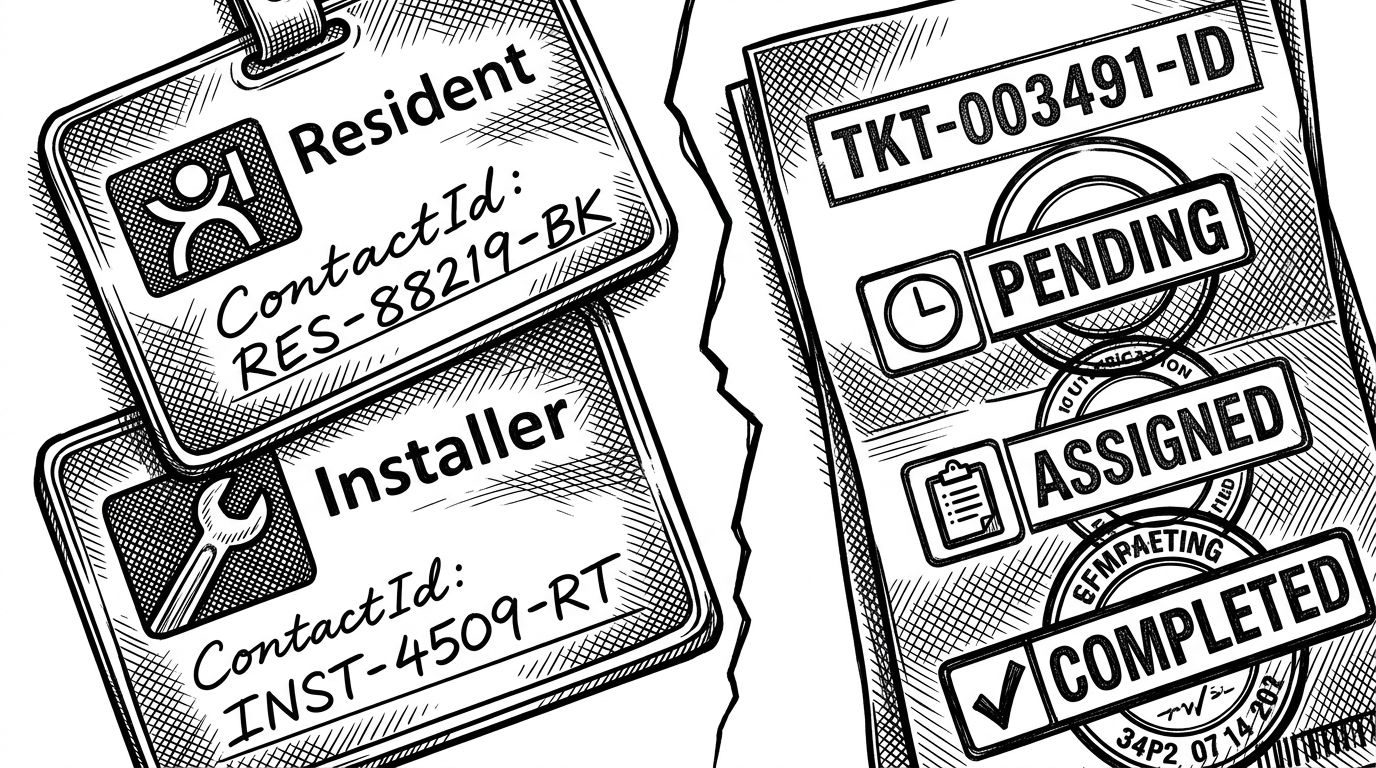
That split is the key design tell. Residents and installers use manually assigned contactId values, while requests use auto-generated IDs. In practice, that means the system treats contact identity as something external or stable, while requests are internal transactional objects.
| Model choice | What it suggests | Why it matters |
|---|---|---|
| Manual contact IDs for residents and installers | Identity comes from a controlled registry or an external convention | The app can link people without forcing every record to be auto-generated |
| Auto-generated request IDs | The request is an internal work order | Each application gets its own lifecycle and audit trail |
| Many-to-one links from request to resident and installer | One resident can own many requests, and one installer can be attached later | The schema matches how assignment actually works |
That is a better model than putting everything into one table with a status column. It keeps the workflow legible, and it makes later assignment possible without rewriting the record shape.
The Admin Dashboard Chooses Guidance Over Speed
The admin side is the most human part of the app. Instead of dropping the user into a dense control surface, adminDashboard.jsx starts in a help state. That is a small choice with a clear message: learn the system first, operate it second.
The view-switching pattern is simple. A single state variable decides whether the admin sees residents, installers, pending requests, or guidance. The result is a command center with guardrails, not a maze of tabs.
This is a simple Solar Tracker System using Arduino Uno and LDR sensors.
Even though that README line describes a different kind of project, it still captures the tone of the repository: a teaching artifact that prefers clarity over ceremony. The code reads like it was meant to be understood by the next person, not just executed by them.
How the Backend Moves State
The request lifecycle lives in RequestService. The important methods are straightforward: applyForSolar creates the request and marks it Pending, then assignInstaller attaches an installer and advances the state to Assigned.
public InstallationRequest applyForSolar(InstallationRequest request) {
    request.setStatus("Pending");
    return requestRepository.save(request);
}

public InstallationRequest assignInstaller(Long requestId, Long installerId) {
    InstallationRequest request = requestRepository.findById(requestId)
        .orElseThrow();
    Installer installer = installerRepository.findById(installerId)
        .orElseThrow();

    request.setInstaller(installer);
    request.setStatus("Assigned");
    return requestRepository.save(request);
}
The query layer is just as revealing. Spring Data method-name derivation keeps the repository thin, so the service can ask for things like requests by resident contact ID without writing custom SQL. That is exactly what you want in a compact workflow app: clear intent, minimal ceremony.
This is where the repo stops looking like a form app. The service layer is acting like a dispatcher, and the request row is the thing being dispatched.
Why the Frontend Feels Centralized
The React app is organized around a few explicit control surfaces. App.jsx uses nested routing so a resident dashboard can keep its shell while swapping views. The backend API is accessed through a centralized Axios instance, which keeps the network layer from leaking through the component tree.
That structure is boring in the best way. It means each screen has a job, and the application does not need a sprawling component hierarchy to feel coherent.
| Layer | Generic CRUD app | This repo | Mature workflow platform |
|---|---|---|---|
| Routing | Flat pages and loose navigation | Nested routes and persistent dashboard layout | Role-aware surfaces with preserved context |
| Admin model | Tables and forms | Help-first command center with view switching | Task queues, filters, and SLA tools |
| Data shape | Records with status flags | Requests as work orders linked to people | Event history, permissions, and auditing |
| Integration | Ad hoc fetch calls | Central Axios configuration | Typed API clients and policy layers |
The difference is not visual polish. It is control. The app keeps the number of places you can act very small, which is exactly what a workflow tool should do.
What This Repo Is Good For, and What It Is Not
As a learning project, this is solid. It demonstrates role separation, request routing, relationship modeling, and a service layer that changes state in a disciplined way. If you are building a niche operations tool, the pattern is useful.
It is not production software. Password handling is plain-string level in the research notes, the security story is thin, and the deployment hardening is not there. The structure is there. The safeguards are not.
| Use case | Fit | Why |
|---|---|---|
| Student project or teaching example | Strong | The code shows the full request lifecycle without unnecessary complexity |
| Early internal prototype | Moderate | The workflow is clear, but security and validation need work |
| Production service platform | Weak | Missing authentication hardening, hashing, and operational safeguards |
That gap is not a failure. It is what makes the repo legible. You can see the business shape without the noise of a mature system.
The Pattern Behind the Project
The real lesson here is reusable. Any small service marketplace can borrow this shape: request, triage, assignment, status, and role-based views. Once you model the work order cleanly, the rest of the product becomes easier to reason about.
That is why this repository stands out. It is not trying to be everything. It is showing how to turn a narrow service business into software without losing the shape of the business.