CodexPro: Turning ChatGPT Into a Local Coding Agent Without Giving It the Keys
A deep dive into the MCP bridge that connects the ChatGPT web UI to your repo, your terminal, and a safer handoff model for agentic coding.

- CodexPro’s novelty is not raw file access, but a controlled handoff that lets ChatGPT plan while a local runtime executes.
- Its safety model is the point of the product, because browser-driven coding only works when path checks, redaction, and workspace confinement are strict.
- The MCP server shapes output into richer tool cards, which makes browser-native coding feel legible instead of noisy.
- CodexPro points to a split future for AI coding, where planner, transporter, executor, and sanitizer are separate jobs.
The browser is not the editor
CodexPro starts with a refusal. It does not pretend the ChatGPT web app should become a trusted shell. Instead, it lets the browser ask for work, then pushes the risky parts into a local boundary that can say no.
That is why the project feels more interesting than a simple MCP wrapper. The surprise is not that ChatGPT can touch a repo. The surprise is that CodexPro makes the browser useful without making it omnipotent.
CodexPro Let ChatGPT web see your Codex-style repo context and act like a local coding agent.
Why the handoff matters more than raw access
The most distinctive mode in the repo is handoff. In that flow, ChatGPT does not directly rewrite your codebase. It writes a plan to .ai-bridge/current-plan.md, and a local executor consumes that artifact later.
That sounds modest. It is not. It changes the trust model. The model can propose, but it cannot freely act. The plan file becomes a checkpoint, not a side effect.
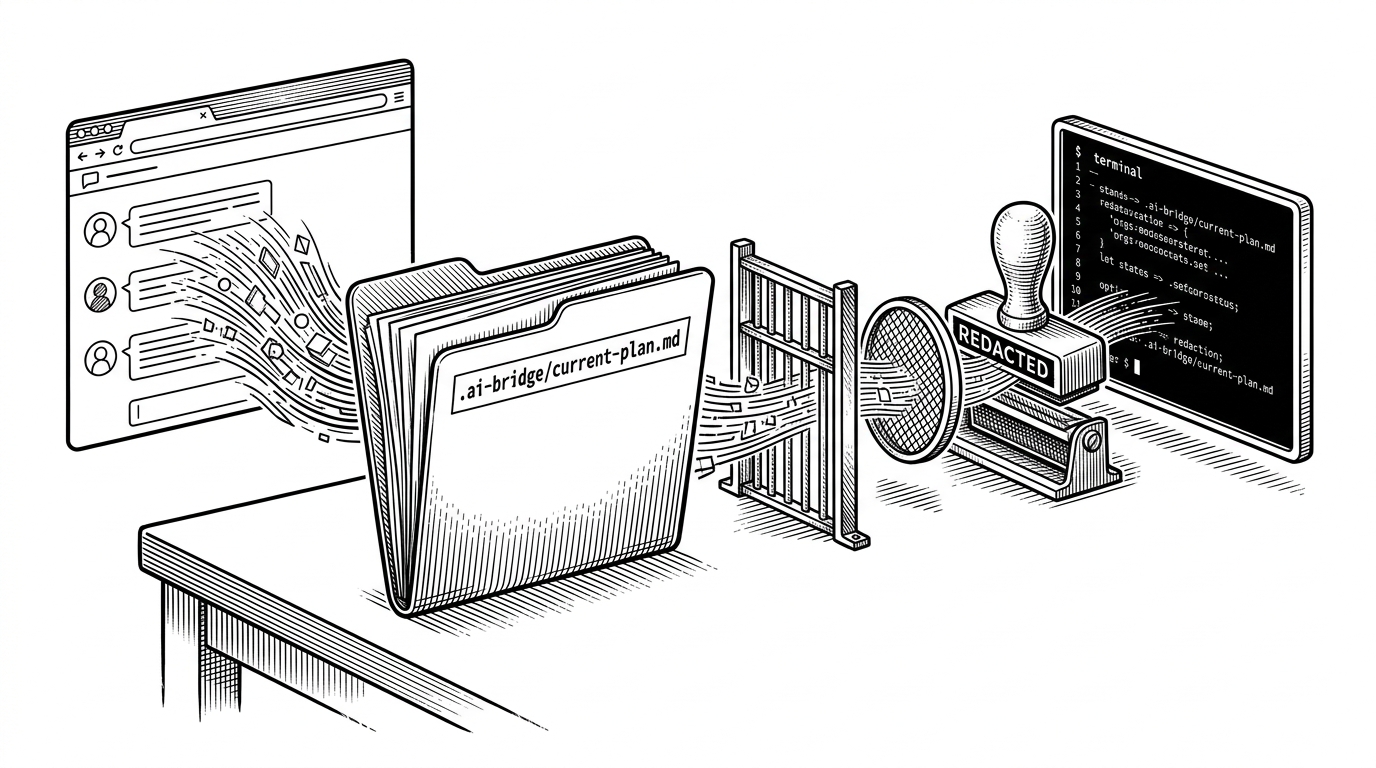
The local jailer
Once a browser can ask for filesystem work, guardrails stop being a bonus feature. In CodexPro, that means path resolution, blocked globs, and workspace confinement are not supporting code. They are the product.
The important move is symlink resolution. If the server only checked a string path, a malicious link could point outside the workspace and smuggle the model into sensitive territory. CodexPro resolves the real path first, then checks whether it still belongs.
| Concern | Weak boundary | CodexPro approach |
|---|---|---|
| Filesystem access | Trust the requested path string | Resolve the real path and validate it against the workspace |
| Sensitive files | Hope the model ignores them | Block globs like .git, node_modules, and .env |
| Terminal output | Return everything verbatim | Redact before tool results reach the model |
| Execution model | Direct edit with broad authority | Constrained tools with explicit workspace rules |
const real = fs.realpathSync(requestedPath)
if (!workspace.contains(real)) {
  throw new Error('Path escapes workspace')
}
if (blockedGlobs.some(glob => minimatch(real, glob))) {
  throw new Error('Blocked path')
}
That is the right paranoia. A local agent is only as safe as its boundary. CodexPro treats the boundary as part of the user experience, not as an internal detail.
How the MCP server turns internal actions into ChatGPT-native tools
The MCP server in server.ts does more than expose functions. It shapes them. Tool calls return structured results through helpers like textResult and errorResult, which keeps the browser response readable and predictable.
The richer move is the tool card system. Instead of dumping a raw wall of text into the chat, CodexPro can present a folded preview for diffs or terminal output. That matters because legibility is part of control.
CodexPro Let ChatGPT web see your Codex-style repo context and act like a local coding agent.
The HTTP bridge is the real product boundary
CodexPro is not trying to win the IDE plugin race. It is betting on the ChatGPT web UI. That is why the transport layer matters so much: it has to make a browser-accessible MCP server feel local enough to be useful, yet remote enough to stay usable through tunnels and admin controls.
This is also where the product looks opinionated. The bridge is built for a web-first workflow, not a terminal-first one. That choice changes who it serves. It favors people who already think in ChatGPT sessions, not people who live inside an editor pane all day.
| Dimension | CodexPro | IDE-first AI coding |
|---|---|---|
| Interaction starts | ChatGPT web app | Editor sidebar or embedded IDE |
| Primary UI owner | Browser session | Local IDE |
| Execution site | Local machine through a controlled bridge | Usually the same desktop app |
| Trust boundary | Explicitly guarded between web and workspace | Tighter but often less visible |
| Best use case | Browser-native planning with local execution | In-editor iteration and rapid file edits |
| Main trade-off | More moving parts, better separation of concerns | Fewer moving parts, less separation |
What CodexPro suggests about the next coding stack
CodexPro is interesting because it makes ChatGPT feel local without pretending the browser should be trusted like a shell. That sounds like a narrow implementation detail. It is really a broader design hint.
The next coding stack may not be one agent with total access. It may be a chain: planner, transporter, executor, sanitizer. CodexPro makes that split visible, and the split is the story.