openai-agents-fastapi-starter: The safest way to let an AI agent touch a shell
A tiny FastAPI starter shows how to pair OpenAI Agents SDK with Vercel Sandbox microVMs, stream every tool call to the browser, and keep code execution ephemeral, inspectable, and serverless.

- This starter makes shell access feel safe by making it disposable, isolated, and request-scoped.
- Its real product is not a chatbot UI, but a repeatable pattern for serverless agentic code execution.
- The terminal frontend is part of the trust model because it exposes every tool call as it happens.
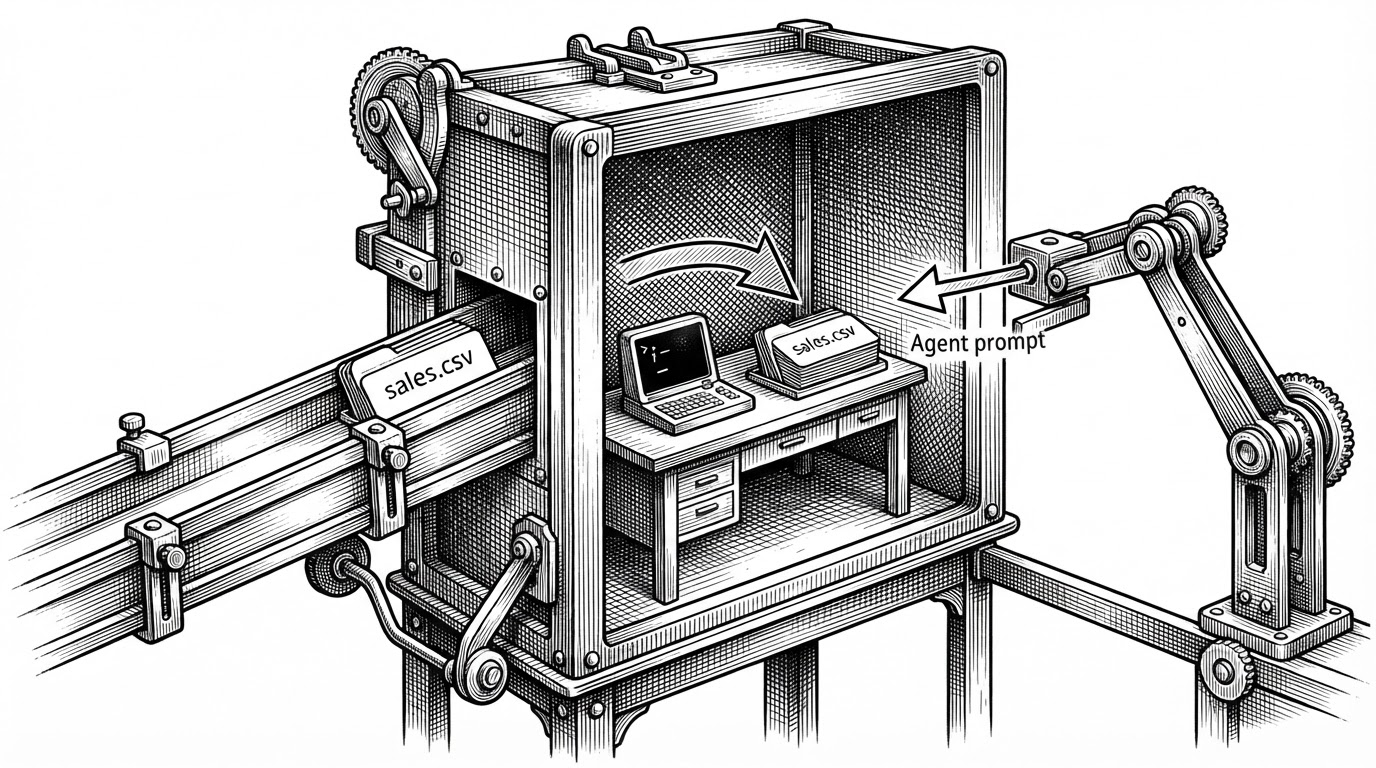
- The manifest-first setup quietly removes friction by putting the right files in place before the agent speaks.
The most interesting thing about vercel-labs/openai-agents-fastapi-starter is not that it uses FastAPI. It is that it makes the oldest objection to agentic tools, security, feel operationally boring. A request can give an agent a shell, but only inside a fresh Vercel Sandbox microVM that exists for the duration of the run.
That matters because most agent demos stop at text. This repo goes one step further, into the risky zone where code can read files, run analysis, and make mistakes. The trick is that the environment is recreated per request, the files are preloaded, the tool use is streamed back to the browser, and the whole thing is torn down at the end.
Minimal FastAPI app that runs the OpenAI Agents SDK with Vercel Sandbox on Vercel's Python runtime. Each request spins up an isolated microVM, gives the agent shell access to analyze data, and tears it down when done.
The loop: request, sandbox, stream, teardown
One POST request drives the entire lifecycle. The FastAPI endpoint creates a sandbox, injects a manifest with data like sales.csv, starts a SandboxAgent with shell access, streams tool activity back as Server-Sent Events, and then destroys the environment. There is no lingering session to babysit.
async def generate():
    async for event in Runner.run_streamed(agent, prompt):
        if event.type == "tool_called":
            yield sse("tool_call", event.name)
        elif event.type == "tool_output":
            yield sse("tool_output", event.output)
        elif event.type == "text_delta":
            yield sse("text_delta", event.delta)

sandbox = VercelSandboxClient()
manifest = Manifest(entries={"sales.csv": File(content=SAMPLE_DATA)})
Why the sandbox is the real product
The repository’s sharpest decision is to treat isolation as the default runtime, not as a bolt-on. A fresh microVM gives you bounded blast radius, no cross-session contamination, and a clean teardown path. That is a different security posture from a long-lived container or a host process that keeps accumulating state.
| Layer | Vercel starter | LangGraph | E2B | Pydantic AI |
|---|---|---|---|---|
| Primary niche | Serverless agentic code execution | Stateful orchestration graphs | Sandbox infrastructure | Type-safe agent logic |
| Runtime | Vercel Functions plus microVMs | Any Python or JS runtime | Cloud microVMs | Any Python environment |
| Main strength | Per-request isolation with visible tool use | Complex multi-step workflows | Managed execution environments | Validation and typed models |
| What it is not | A general orchestration framework | A sandbox product | A full agent application stack | An infrastructure layer |
The UI refuses to hide the agent
The browser does not pretend the model is harmless. It listens for tool_call, tool_output, and text_delta events, then renders them as terminal-like blocks. That turns the frontend into a trust surface, not just a demo shell.
That design choice matters. If an agent is going to run commands, users need to see the commands. Transparency here is not cosmetic. It is how the product earns permission to be useful.
Where this fits in the agent landscape
This starter sits at the intersection of framework, runtime, and deployment template. LangGraph is broader and better for complex state machines. Pydantic AI is stronger when Python teams want tighter typing and validation. E2B is the infrastructure peer that focuses on sandboxed execution. This repo narrows the scope further: it is a reference pattern for serverless code-capable agents with per-request isolation and visible tool use.
That is why it feels small in the best way. It is not trying to be the brain, the cloud, and the UI at once. It shows one clean loop, and that loop is useful enough to copy.
What the starter leaves open
The template is honest about its limits. It does not solve long-running workflows, richer tool stacks, durable memory, or multi-agent coordination. It gives you a very sharp building block, then leaves the larger system design to you.
That is also what makes it valuable. If your problem is "I need an agent to inspect files and run commands without putting the host at risk," this repo is already close to the answer. If your problem is broader, it is still a useful reference for the safest part of the stack.
| Question | Starter answer | Open question |
|---|---|---|
| How do I let an agent touch a shell safely? | Run it inside a disposable Vercel Sandbox microVM. | How much policy and auditing do you want on top? |
| How do I make the agent legible? | Stream tool calls and outputs to the browser. | Should users also get persistent logs or replays? |
| How do I preconfigure data analysis? | Inject files through the manifest before the prompt. | What other assets need to be mounted or fetched? |
| How do I scale the pattern? | Treat the sandbox as a short-lived execution event. | What workflow layer should orchestrate multi-step jobs? |