campus_buddy: CampusBuddy: The LMS That Treats Classroom Chat Like Infrastructure
A Node, React, and PostgreSQL system that blends live messaging, role-based access, OTP onboarding, and moderation into one campus-wide workflow.
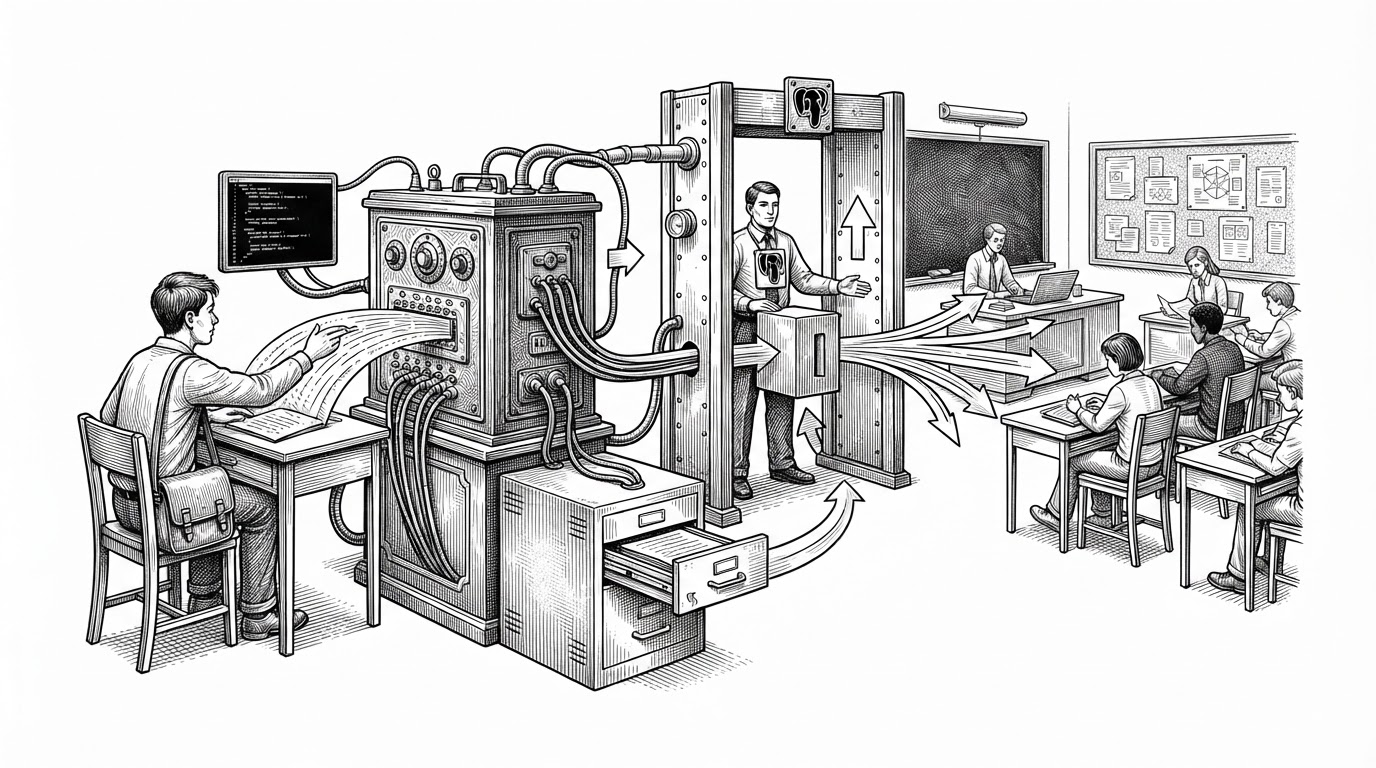
- CampusBuddy’s core idea is that classroom communication should be routed, moderated, and persisted as one system instead of scattered across separate chat and LMS features.
- Its socket flow is the product, because it combines low-latency delivery with immediate PostgreSQL writes and later REST-based retrieval.
- Trust is enforced early through OTP onboarding, role-based middleware, and classroom membership rules that shape what each user can see and do.
- The repo reads less like a content-first LMS and more like a campus coordination layer built around live state.
The classroom is a live system, not a page
Most LMS products start with content. CampusBuddy starts with motion. A classroom message is not just posted, it is routed, checked, delivered, and saved in one pass, which makes the app feel closer to an operating layer than a course portal.
That choice matters because campus communication is messy. Students chat with each other, staff make official announcements, and admins need durable history. CampusBuddy treats those as different traffic classes instead of forcing them through one generic feed.
Why the message flow is the whole story
In backend/server.js, Socket.io is not a sidecar. It is where the app decides who can talk, who should see the message, and whether the message deserves a notification. The server keeps a connectedUsers map, sends direct messages to a specific socket, and broadcasts classroom messages to a room.
socket.on('send_message', async (payload) => {
  const { roomId, senderId, message, type } = payload;

  // lookup connected user
  const recipientSocketId = connectedUsers.get(payload.recipientId);

  // persist first-class message history
  await pool.query(
    'INSERT INTO messages (room_id, sender_id, message, type) VALUES ($1, $2, $3, $4)',
    [roomId, senderId, message, type]
  );

  if (type === 'dm' && recipientSocketId) {
    io.to(recipientSocketId).emit('new_message', payload);
  }

  if (type === 'classroom') {
    io.to(`classroom_${roomId}`).emit('classroom_message', payload);
  }
});
The real move is not the socket event itself. It is the fact that persistence happens inside the same flow as delivery. That means the system does not have to choose between live chat and durable history. It gets both.
| Pattern | Strength | Trade-off |
|---|---|---|
| REST-first chat | Simple to reason about, easy to store | Feels laggy and passive |
| Socket-only chat | Fast and interactive | History can become fragile |
| CampusBuddy hybrid flow | Instant delivery plus durable records | More logic in the transport layer |
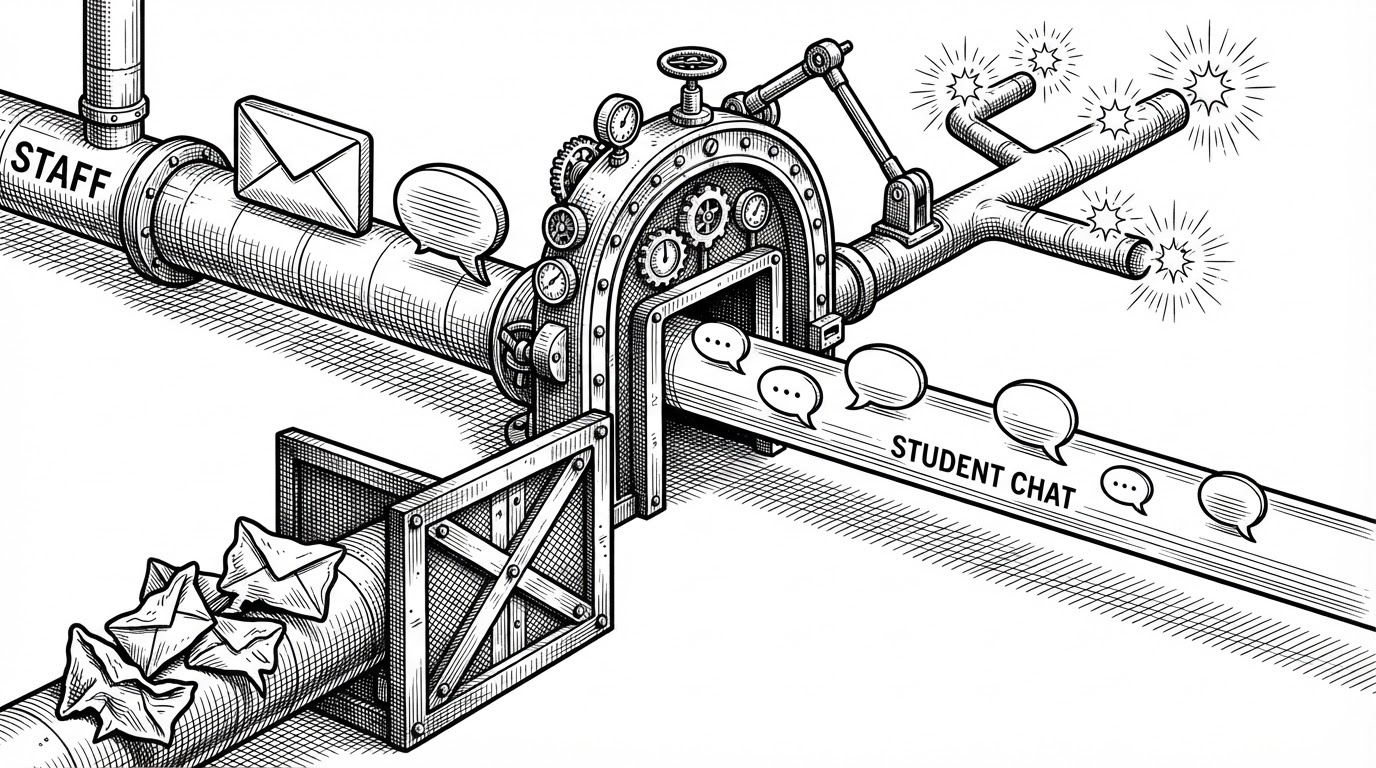
Moderation is built into the transport layer
That second illustration is the key design clue. The app checks the classroom block list before it fans a message out, which means moderation is not a UI afterthought. It is part of delivery.
That choice keeps the system honest. If a user is blocked, the app does not merely hide a message after the fact. It stops the message at the gate.
| Scenario | What CampusBuddy does | Why it matters |
|---|---|---|
| Peer chat in a classroom | Delivers the message without extra fan-out | Keeps chatter lightweight |
| Staff announcement | Sends the message and triggers notifications | Signals authority clearly |
| Blocked sender | Stops the classroom message at the check | Enforces moderation before exposure |
The trust stack starts before login
CampusBuddy does not wait until the dashboard to establish trust. OTP verification creates a first checkpoint, and the expiration logic keeps that checkpoint from becoming a loophole. After that, role middleware decides whether a user can reach staff, student, or admin routes.
That sequence is a good fit for campus software. A university app is always asking two questions at once: who are you, and what are you allowed to do here? CampusBuddy answers both early, then carries those answers through the rest of the experience.
// auth middleware sketch
if (!req.user) return res.status(401).json({ error: 'Unauthorized' });
if (!allowedRoles.includes(req.user.role)) {
  return res.status(403).json({ error: 'Forbidden' });
}
Classroom membership behaves like a state machine
The classroom controller makes the product feel organized instead of crowded. Staff create classrooms, students request to join, and the app separates joined rooms from rooms that are still available. That is not just a filter. It is a lifecycle.
Once you think in states, the UI makes more sense. A student is not simply looking at a list of classrooms. They are moving through join requests, membership, and participation, while staff hold the authority to accept and coordinate.
The schema tells the project’s age
The migration history suggests a project that kept growing in scope. Early tables handled the basics, then later scripts added avatars, notification settings, preferences, analytics, and richer user profiles. That is the footprint of a product that moved from prototype to platform.
There is a trade-off here. Raw SQL and many migrations give the team clarity and control, but they also demand discipline. The upside is visible in the repo structure: the data model is doing real product work, not just storing forms.
| Layer | Early shape | Later shape |
|---|---|---|
| Identity | Login and OTP | Role-aware profiles and avatar support |
| Communication | Basic messages | Persistent real-time classroom messaging |
| Ops | Simple notifications | Notification preferences and analytics |
| Data access | Core queries | Broader schema evolution through migrations |
What CampusBuddy is, and what it is not
CampusBuddy is not just another LMS, and it is not just a campus chat app. It sits between those categories. The point is coordination: who can speak, who needs to hear it, and how the system remembers what happened.
That makes it more interesting than a static course portal and more structured than a generic chat stack. It is a campus communication layer with rules, memory, and roles baked in.
| Conventional LMS + chat | CampusBuddy |
|---|---|
| Assignments, files, announcements | Live classroom messaging with durable history |
| Chat bolted on as a separate tool | Chat built into the delivery model |
| Permissions mostly at page level | Permissions enforced in transport and membership |
| Communication and records split apart | Communication and persistence tied together |