Exo: The Email Client That Hides the AI in Plain Sight
An AI-native desktop inbox that triages messages, learns your writing style, and runs agents in the background so replies are ready before you ask.
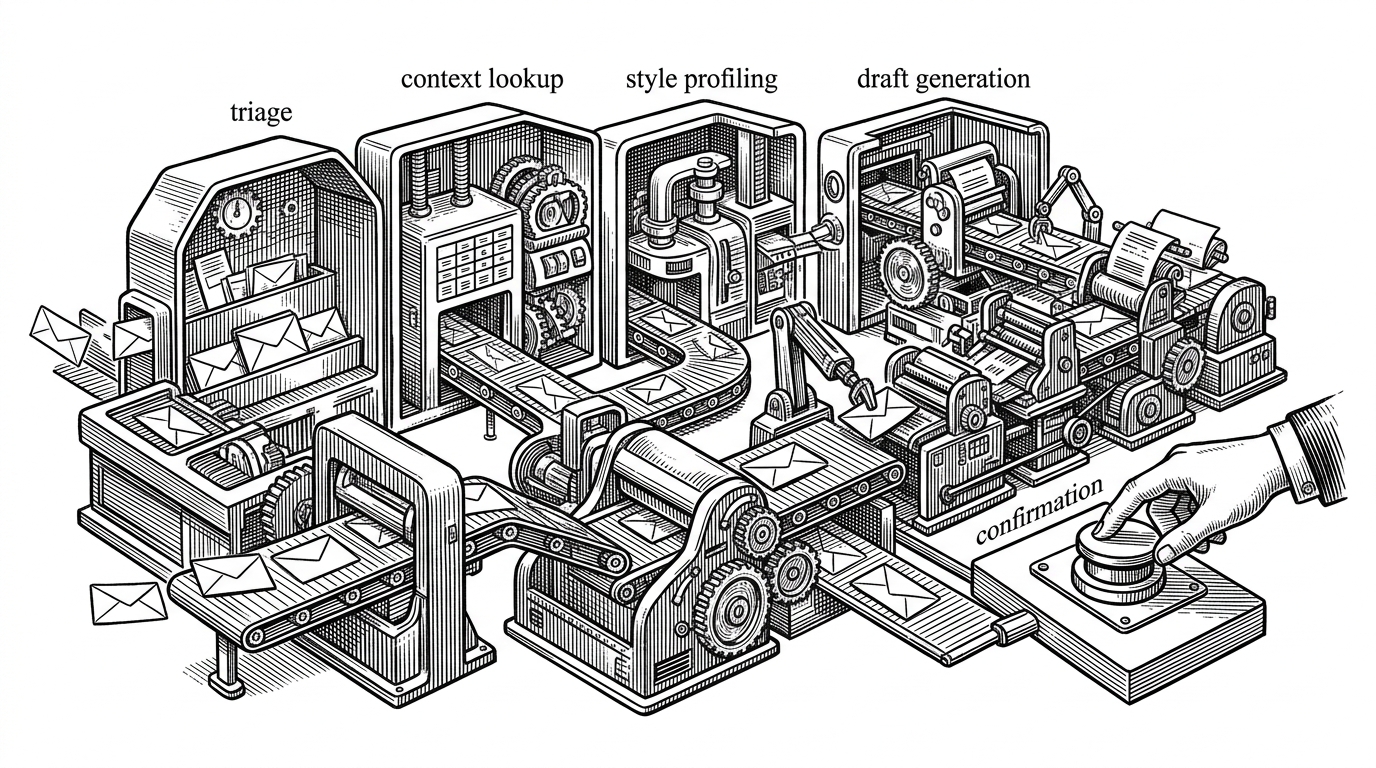

It turns out that using just a single LLM call (as Gmail's "Smart Reply" seems to do natively) produces slop. With the right agent, you can get enough context to draft a great reply.
- Exo is not an email client with AI features added on top. It is an AI system that uses email as the interface.
- Its core move is timing. Triage, context gathering, and draft preparation happen before the user opens the message.
- The product leans on local-first storage, background agents, and permission gates so delegation stays fast and legible.
- Style profiling turns generic drafts into replies that can match sender, thread, and tone without hiding the controls.
Most inboxes ask you to do the work in sequence. Open message, read, search for context, decide, draft, revise, send. Exo tries to compress that loop. By the time an email lands in front of you, the system may already know how urgent it is, who sent it, what the thread means, and what a reply should look like.
That is the real shift here. Exo is not a prettier mail app with a chatbot tucked into the sidebar. It is an agentic desktop client that treats email like an orchestration problem.
The Inbox Before You Open It
Exo treats AI as a first-class citizen — not a bolted-on feature. Every email gets analyzed, prioritized, and optionally drafted before you even open it. The goal is zero cognitive load: open your inbox and everything is already handled or ready to send.
That quote is the thesis, but the product experience is the proof. Exo classifies incoming mail into a small set of triage states, builds drafts in the background, and surfaces the work only when human judgment is actually needed. The inbox becomes a queue of prepared actions, not a pile of unfinished reading.

Why Exo Feels Different from AI Features in Other Mail Apps
| Dimension | Traditional inbox with bolt-on AI | Exo |
|---|---|---|
| Workflow ownership | User sorts first, AI helps later | Agent triages and drafts first, user approves later |
| Draft timing | After you click compose | Before you even open the message |
| Context gathering | Manual search across threads and contacts | Automatic lookup from local mail and history |
| Personalization | Generic assistant tone | Style profiling from sent-mail examples |
| Deployment model | Cloud-first or plugin-based | Local-first desktop app with background agents |
| User control | Direct editing only | Permission-gated delegation with confirmation for sensitive actions |
The table is the easy part. The harder point is psychological. In a normal inbox, every message feels like a fresh task. In Exo, the task has already started running before you arrive.
That is why the app feels less like a reading surface and more like a control surface. The user is still in charge, but much of the repetitive cognition has been pushed into the background.
The Hidden Engine: Agents, Tools, and Permission Gates
Under the hood, Exo is built around a provider registry, tools, and a permission gate. Agents can search mail, inspect thread history, draft replies, and route more sensitive actions through confirmation before anything is sent. That matters because trust is the product. The AI is useful only if it stays visible enough to interrupt.
The architecture also keeps the interface responsive. Agent work runs in a separate utility process, while the main app handles the window, the renderer, and user interaction. Heavy reasoning stays out of the way of the desktop experience.
// Simplified shape of Exo's delegation loop
const result = await orchestrator.run({
  tool: 'draft-reply',
  messageId,
  permission: 'confirm-before-send'
})

if (result.needsConfirmation) {
  requestConfirmation(result.preview)
} else {
  renderDraft(result.text)
}
How Exo Learns to Sound Like You
This is where Exo stops feeling like a generic assistant. The app reads from the sent folder, extracts style samples, and builds correspondent profiles that track things like formality and greeting preferences. It is not only trying to answer the email. It is trying to answer it in the right register for the person on the other end.
That line is blunt, and it is also the right framing. Style is not garnish. In email, style is part of the message. A draft that gets the facts right but misses the social tone still creates work for the user.
Exo’s style layer is interesting because it makes personalization operational. The system is not just generating text. It is learning the patterns that make the text safe to send.
The creator behind the project
Why the Architecture Stays Fast
The utility-process choice is easy to miss, but it explains a lot about the feel of the app. Exo can run expensive language-model tasks, tool calls, and local lookups without making the main window feel sluggish. That separation is what lets the app behave like a desktop product instead of a web page pretending to be one.
There is also a local-first payoff. Emails, analyses, and style samples live in SQLite-backed structures, which means the app can enrich and reuse context instead of rebuilding it from scratch on every interaction. The inbox gets faster because the system is allowed to remember.
What Exo Suggests About the Next Inbox
Exo points at a different unit of work. The old inbox is a place where you inspect and react. Exo is trying to turn it into a place where the machine prepares and the human approves.
That model is powerful, but it only works if the AI stays legible. Users need to see why a message was prioritized, what the draft is based on, and how to override it when the system gets the social context wrong. Exo is promising because it does not hide the machinery. It moves the machinery into the background without pretending it is magic.
The result is a sharper claim than “AI email.” Exo is a preview of what happens when inbox software stops optimizing for message display and starts optimizing for decision flow.