PyRoot Drives a Robot With 20 Bytes and a Checksum It Never Calculates
A tiny Python repo reverse-engineers the Root robot's closed BLE protocol, then quietly turns the toy into a self-localizing waypoint follower.

- PyRoot documents a closed BLE protocol the honest, low-tech way: every Root command is a fixed 20-byte packet written as a plain Python list.
- The trailing checksum byte is a magic constant lifted from captured traffic, never computed, and the code comment admitting this is the most revealing line in the repo.
- The same flat repository escalates a desk toy into a self-localizing robot by fusing ultrasonic trilateration, an IMU, and a PID loop over CSV waypoints.
- It is a working example, not a framework: no packaging, no tests, duplicated BLE code, and rough edges you are expected to sand off yourself.
The Whole Protocol Fits in a List of 20 Numbers
Every command the Root robot accepts is a fixed 20-byte packet. Not a variable-length frame, not a serialized object. Twenty bytes, every time. The first byte picks the command family, and the rest is a rigid layout of fields. To drive the robot forward, you write a Python list of twenty integers and hand it to the BLE characteristic. That is the entire protocol surface.
The transport is a Nordic-style UART service, the same 6e400001-b5a3-f393-e0a9-e50e24dcca9e family you find on countless BLE devices. Root presents itself as a byte-stream serial port over Bluetooth, and PyRoot talks to it directly. No vendor SDK, no official Python library, no abstraction layer. Just the UUIDs, the byte layout, and a write_value call.
That is what makes the repo interesting. A closed, consumer-facing robot has a protocol, and someone sat down with a packet capture and wrote it out as literals. You can read the whole thing.
A Toy Robot, Three Python Files, and No Build System
The repository is flat. Three scripts, two waypoint CSVs, a README, and nothing else. No requirements.txt, no setup.py, no tests, no CI. The dependencies are documented in prose and you install them by hand. The GitHub language breakdown reports Python and only Python.
The earliest file is named drive-root-orginal.py, typo included. It connects, waits for the robot, and drives forward when you press Enter. The .gitignore excludes a private scratch file called roottest.py. This is informal, ad hoc development, the kind that happens on a workbench rather than in a release pipeline.
- 3 scripts: a baseline client, an interactive controller, and an autonomous navigation rig
- 20 bytes: the fixed packet size every command uses
- 0 build files: no packaging, no dependency manifest, no test harness
Python control of Root Robot via BLE
The README credits one helper, @mogenson, and points readers at the upstream Root robot BLE protocol repo for the full API. That is the shape of the project: a small, working example that hands you the keys and gets out of the way.
Anatomy of a Packet
The motion packet is the one that matters. Byte 0 is the family, 0x01. Byte 1 is a sub-command, always 0x04 in this code. Byte 2 is reserved. Then bytes 3 through 7 hold the left wheel speed as a big-endian signed 32-bit integer, and bytes 7 through 11 hold the right wheel speed the same way. The rest is padding, and byte 19 is the checksum.
The to_bytes(4, byteorder='big', signed=True) calls confirm the encoding. When you drive forward, both speed fields get 0x64, which is 100. When you drive backwards, they get FF FF FF 9C, which is negative 100. The pen packet is a different family, 0x02, and byte 3 toggles between 0x00 for up and 0x01 for down. That is the whole pen interface.
Only two helpers actually compute fields. turn_rate(rate) maps a signed rate to a differential pivot: if the rate is positive the left wheel drives and the right stays at zero, and if negative the right wheel drives and the left idles. It is a pivot model, not an arc. The robot spins in place on one wheel. steer(left, right) generalizes this to independent wheel speeds, though the only call site in the interactive script is an unused branch that hard-codes steer(30, 40).
There is a sign-convention hazard worth flagging. drive_left() encodes a left turn as left equals zero and right equals 100, meaning the right wheel drives. But turn_rate() with a positive value makes the left wheel the active one. The two code paths disagree about which wheel is the driven one, and nothing documents which sign means clockwise. Test before you trust either direction.
The Checksum Is a Lie, and That Is the Point
Here is the line that tells you everything about how this repo was built. It sits in the code as a comment on the packet construction:
# note that we're not dynamically calculating the CRC at the end, so just leaving it 0 (unchecked)The comment is honest and also slightly misleading. It says the code leaves the CRC at zero because it is unchecked. But look at the hard-coded commands. drive_forward() ends in 0xD1. drive_left() ends in 0x8A. stop() ends in 0x7E. Those are not zero. They are non-zero checksums almost certainly copied straight out of a packet capture. The dynamic methods, the ones that compute wheel speeds, end in 0x00.
So the author never implemented the CRC algorithm. The captured commands carry the checksum the real robot sent, and the computed commands carry zero with the implicit claim that the robot ignores the field on those paths. That claim is unverified. It is not tested in the repo, and there is no evidence in the source that the robot's firmware accepts a zero checksum. It might work perfectly. It might fail on a firmware revision nobody has tried. The code does not know, and neither do you.
This is what low-tech protocol documentation looks like when it is done honestly. You capture traffic, you write down the bytes, you mark the parts you do not understand, and you ship something that works for the cases you care about. It is not elegant. It is also how a lot of real reverse engineering actually happens.
Then Someone Turned the Toy Into a Robot That Knows Where It Is
The third script, layoutroot.py, is where the project stops being a demo. It turns the Root into a self-localizing robot that follows waypoints across a room. The file attributes itself to "Chris Anderson, 3DR, 2018" in a code comment, and it reads like a robotics demo built to show off a positioning stack.
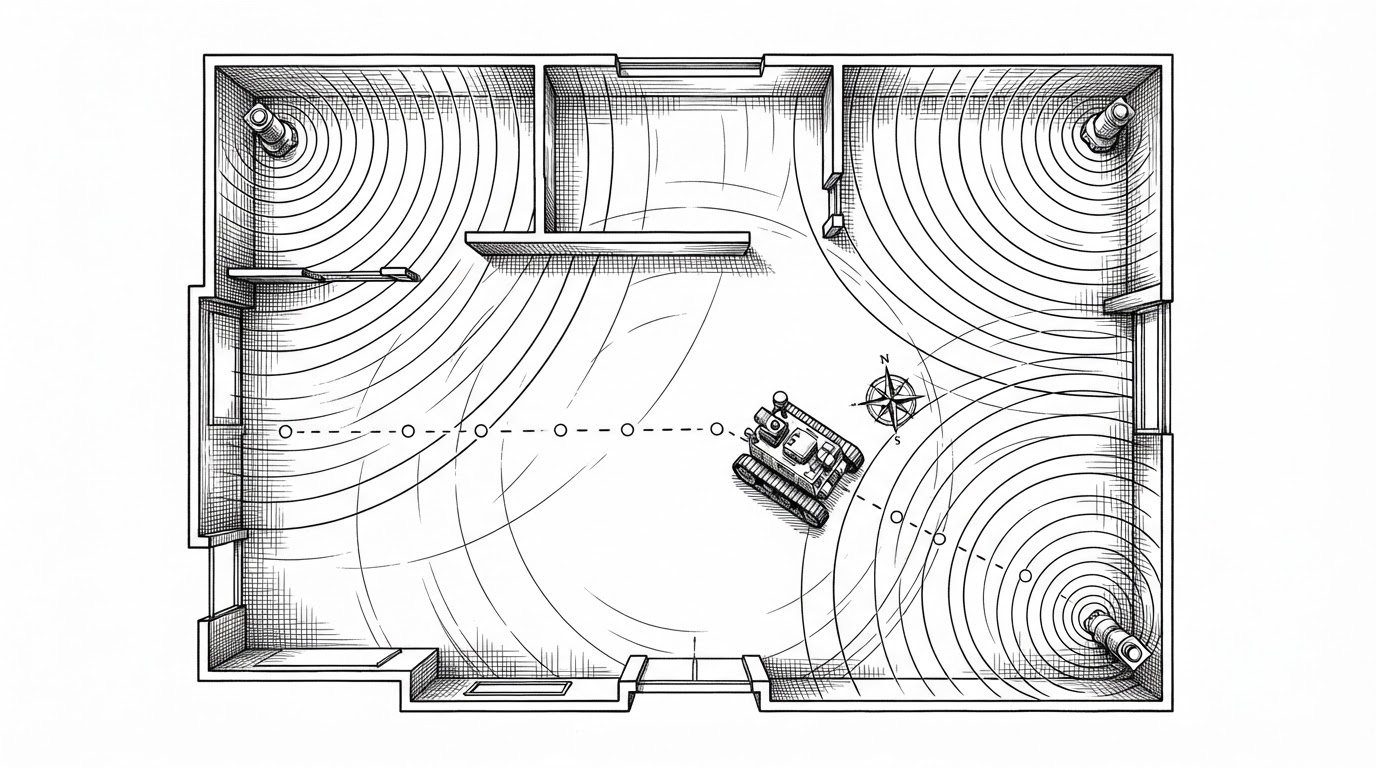
Absolute position comes from a Marvelmind hedgehog, a mobile beacon that reads its location from fixed ultrasonic beacons over a serial port. Heading comes from a BNO055 nine-axis IMU, compass-calibrated with hard-coded hard-iron offsets computed as midpoints of measured magnetometer readings. Then a PID loop chases waypoints loaded from a CSV.
| Sensor | Hardware | What it provides | Role in the loop |
|---|---|---|---|
| Position | Marvelmind hedgehog | Absolute x, y over ultrasonic trilateration | Tells the robot where it is in the room |
| Heading | BNO055 IMU | Compass-calibrated orientation | Tells the robot which way it faces |
| Control | PID (kp 0.6, ki 0.0, kd 0.4) | Steering correction from heading error | Closes the gap to the next waypoint |
The gains are textbook: proportional at 0.6, derivative at 0.4, and integral held at exactly zero. That last choice is the sensible one. On a noisy, slow-responding pivot-drive platform, an integral term winds up and the robot oscillates around the waypoint instead of settling on it. Leaving it at zero trades a little steady-state error for stability. Someone who has tuned a small robot before made that call.
The rough edges are real. Hardware initialization, file loading, and a one-second sleep all run at module import, so you cannot import the file for testing without the sensors attached. There is no if __name__ == "__main__" guard. The BLE code is copied verbatim from the interactive script, roughly 100 lines of duplication. Builtins like range and type get shadowed. Waypoints are pre-allocated to a hard cap of 1000 rows, and a longer CSV raises an IndexError. It is a demo, and it reads like one.
How PyRoot Compares
PyRoot sits in a narrow niche: a runnable Python example for driving the Root over BLE, with an autonomy demo bolted on. Here is where it stands against the alternatives.
| Approach | Layer | What it gives you | Trade-off vs PyRoot |
|---|---|---|---|
| zlite/PyRoot | Python app example on Linux BLE | Letter-command driving, pen control, sensor display, plus an autonomy demo | Root-specific, small, immediately runnable; rough edges and no packaging |
| Root robot BLE protocol | Protocol and API reference | The full command surface and byte formats | Lower-level; you still write the client |
| gatt-python | Python BLE transport library | The BLE plumbing PyRoot depends on | General transport, not Root-aware |
| Custom protocol client | Built by you | Any interface you want | You own all the implementation and interaction logic |
One caution on the name. There is a much larger project called PyROOT, the Python bindings for CERN's ROOT data-analysis toolkit. It has nothing to do with robots. If you search for PyROOT and land on a paper about scientific computing, you are in the wrong place.