mlxstudio: MLX Studio: The Local AI App That Tries to Replace Your Cloud Model Stack
A native macOS wrapper around vMLX, MLX Studio turns Apple Silicon into a polished local AI workstation with chat, image generation, tool calls, and API compatibility that can stand in for cloud endpoints.
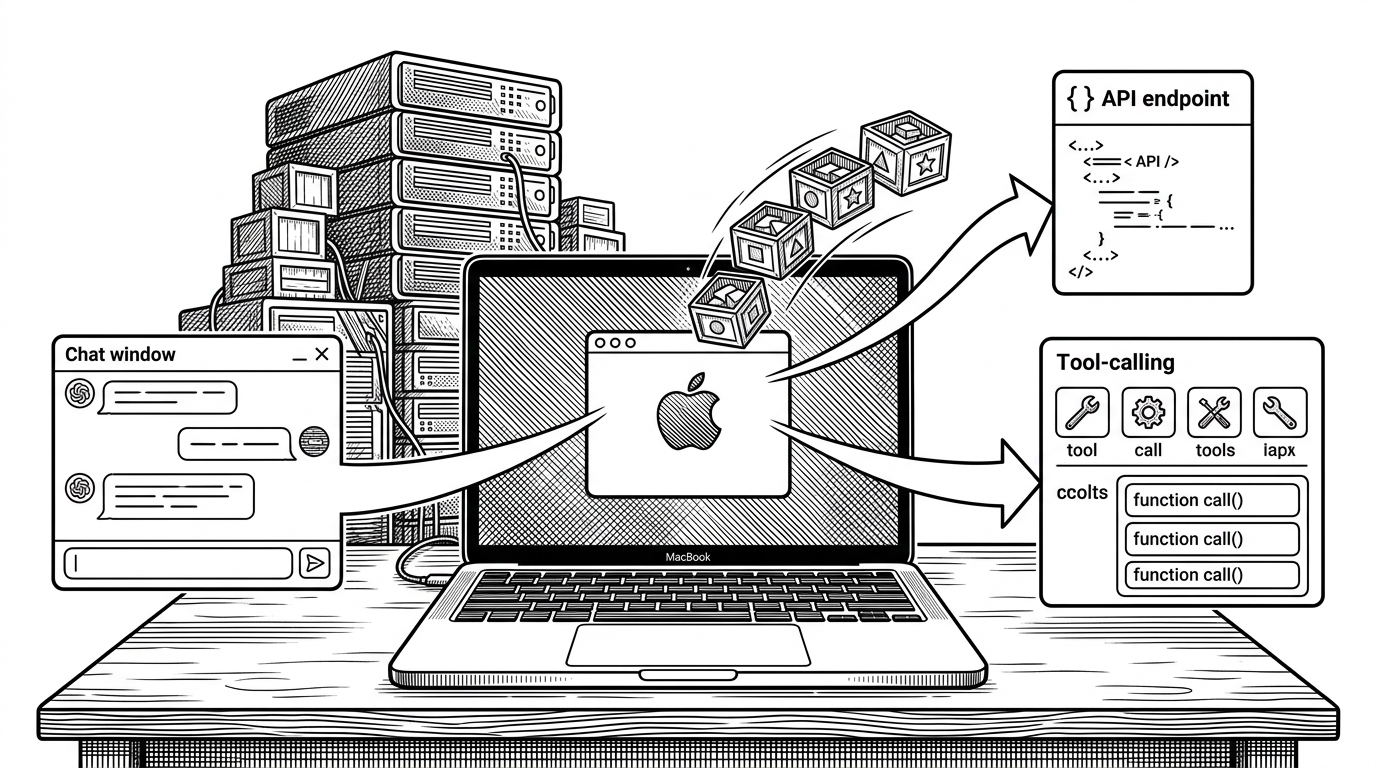
- MLX Studio is interesting because it behaves like a substitution layer, not just a local chat app.
- Its real product is the bundle of GUI, server, and compatibility glue that makes Apple Silicon feel like an AI appliance.
- vMLX provides the engine underneath, while MLX Studio packages the experience and distribution around it.
- JANG quantization is the project’s boldest technical bet, because it tries to preserve quality while compressing aggressively.
The strongest argument for MLX Studio is not that it runs models locally. It is that it tries to make local models look enough like cloud infrastructure that you can keep your existing habits, SDKs, and deployment assumptions. That is a different kind of local AI product, closer to a substitute backend than a hobbyist runner.
Local AI, but as a substitution layer
MLX Studio sits in an awkwardly powerful spot. It is a polished macOS app, but it also wants to be a local endpoint that feels familiar to builders who already live inside OpenAI-style or Anthropic-style workflows. That matters because the lowest-friction way to adopt local AI is not to relearn the stack. It is to swap the engine under the hood.
| Layer | MLX Studio | Plain local runner |
|---|---|---|
| User experience | Native macOS app with chat, image, tools, and server views | Usually a focused interface around model loading and inference |
| API shape | Tries to look like familiar cloud endpoints | Often exposes only its own local interface |
| Audience | Non-technical users and developers | Mostly developers |
| Goal | Replace part of the cloud workflow | Run models on the machine |

What MLX Studio actually bundles
The repo is best read as a packaging layer around a more serious engine. The app experience includes chat, server mode, image generation, tool use, and model browsing, but the heavy inference work lives in vMLX. That split is important: MLX Studio is the appliance, vMLX is the machinery.
The launch flow is intentionally boring, which is a compliment. Install the DMG, open the app, choose a model, and the server can come up alongside the UI. In practice, that removes the old ritual of environment setup, local ports, and separate tools for the front end and the backend.
Model source -> vMLX core -> local server -> desktop UI
                  -> OpenAI-style API
                  -> Anthropic-style messages
                  -> tool execution layer
No Python. No terminal. No config files. Download the DMG, drag to Applications, and run AI models locally in seconds.
vMLX is the part that makes it real
The compatibility story only works if the engine is solid enough to sit underneath it. That is where vMLX matters. It is the layer that turns a model download into a functioning local service, and it is also where caching, batching, and inference behavior have to be disciplined enough to support multiple interfaces at once.
That division of labor is elegant. The desktop app can stay opinionated and friendly while the engine handles the more hostile parts of the problem: model loading, request routing, and whatever translation is needed to keep different client shapes alive on the same core.
The compatibility trick: making local models speak cloud
This is the move that makes MLX Studio feel less like a viewer and more like a replacement. If your local model can answer through an OpenAI-style endpoint, and also behave like an Anthropic-style messages endpoint, you can point real tools at it without rebuilding your app around a new backend contract. That is a much bigger deal than a nice chat window.
| Interface | What the client expects | What MLX Studio tries to provide |
|---|---|---|
| Desktop chat | Human-friendly conversation | A native macOS UI over local inference |
| OpenAI-style | A familiar /v1 endpoint and response shape | A local drop-in API surface |
| Anthropic-style | Messages API semantics and tool behavior | Compatibility that keeps client code changes small |
| Tool calls | Structured function execution | Schema translation and execution through local tools |
JANG quantization is the gamble
Quantization usually means accepting a tradeoff: smaller models, lower quality. JANG is trying to break that mental model by saying that precision does not have to be evenly sacrificed. Keep the important layers cleaner, compress the rest harder, and maybe the model stays sharp where it matters.
That is why the 2-bit claim is so provocative. It is not just smaller. It is a bet that adaptive mixed precision can preserve enough behavior to make the whole platform better than generic low-bit baselines. If that holds up across more models, then the quantization story becomes part of the product story, not just an implementation detail.
| Approach | Compression strategy | Expected tradeoff |
|---|---|---|
| Standard low-bit quantization | Reduce precision broadly and evenly | Simple, but quality can fall off fast |
| JANG adaptive mixed precision | Preserve critical layers, compress others harder | More complex, but aims to keep behavior intact |
| No quantization | Keep higher precision throughout | Better quality, worse footprint |
Why this is not just another local runner
Compare MLX Studio with LM Studio, Ollama, or plain MLX and the shape of the ambition gets clearer. LM Studio is polished. Ollama is practical. Raw MLX is powerful. MLX Studio is trying to be the thing that sits between those categories and collapses several jobs into one Apple-native package.
| Project | Best for | Main difference |
|---|---|---|
| MLX Studio | Users who want an Apple-native AI appliance | GUI, server, tools, image generation, and API compatibility in one app |
| LM Studio | People who want a polished local model runner | Strong desktop UX, but less focused on built-in agent tooling |
| Ollama | Developers who want a simple backend | Backend-first workflow with less consumer polish |
| Plain MLX or vMLX | Builders who want direct control | Powerful, but more hands-on and less bundled |
The risk behind the ambition
The upside of a fast-moving, single-lead project is obvious. The downside is just as obvious. A broad compatibility surface, a growing feature set, and a lot of moving parts can make a project feel like it is one release away from either becoming essential or becoming hard to hold together.
That tension is why MLX Studio is interesting. It is not trying to be modest. It is trying to make local AI feel complete on the Mac, even if that means owning the app, the server, the tools, the API shape, and part of the performance argument at the same time.