Splash-Cursor: The Fluid Simulation That Lives Inside a React Component
A close look at how a cursor effect turns into raw WebGL, shader plumbing, and Shadcn-style copy-paste distribution.

- Splash-Cursor matters because it packages GPU-level fluid simulation as a component you can copy into a codebase instead of studying like a framework.
- Its real differentiator is not the visual effect alone, but the combination of raw WebGL control and Shadcn-style distribution.
- The repo survives on weaker hardware by probing browser capabilities and scaling the simulation down when needed.
- This is part of a larger React trend: advanced motion effects are becoming source code you adopt, not black-box dependencies.
StarKnightt/Splash-Cursor is a cursor effect that behaves less like a UI trick and more like a tiny graphics engine. It tracks pointer input, pushes that motion through WebGL, and turns the result into a fluid splash that stays responsive enough to be useful on real pages.
nothing just another experimental component
A Cursor Effect That Behaves Like a Graphics Engine
The surprise here is not that the cursor leaves a trail. It is that the trail is powered by a custom simulation stack: context detection, shader programs, framebuffer swapping, and pressure and velocity updates that repeat every frame. That is a lot of machinery for a decorative flourish, which is exactly why the repo is interesting.
Most cursor effects live in the comfort zone of CSS transitions or lightweight animation helpers. Splash-Cursor goes lower. It appears to calculate motion directly in the browser’s graphics pipeline, which gives it the control needed for a liquid feel instead of a canned particle wiggle.
Why the Repo Is Built to Be Copied, Not Installed
The distribution model is as important as the rendering model. The repo includes a Shadcn-compatible registry file, which means the component is meant to be pulled into your project as owned source. You are not just importing a library. You are adopting code you can inspect, edit, and keep.
| Approach | Setup cost | Visual sophistication | Runtime control | Overhead | Ownership | Best use case |
|---|---|---|---|---|---|---|
| CSS-only ripple effects | Low | Low to medium | Limited | Very low | High, but shallow | Simple click feedback |
| Anime.js or similar | Medium | Medium | Medium | Low to medium | Medium | Motion sequences and UI choreography |
| Three.js or p5.js | High | High | High | High | Medium | Creative coding and custom scenes |
| Splash-Cursor | Medium | High | High | Medium | High | Cursor-driven fluid effects that should ship as source |
Inside the Engine Room: WebGL, Shaders, and Double Buffering
The core implementation leans on a familiar fluid-sim pattern: read from one texture, write to another, then swap them on the next frame. That ping-pong structure is what lets the component preserve state over time. Without it, the simulation would collapse into a one-off image instead of an evolving field.
// Simplified model of the loop
let readTarget = textureA;
let writeTarget = textureB;

function frame(cursorState) {
  injectForce(cursorState, readTarget, writeTarget);
  updateVelocityAndPressure(writeTarget, readTarget);
  renderLatest(writeTarget);

  [readTarget, writeTarget] = [writeTarget, readTarget];
}
The repo also does the kind of browser capability work that separates demo code from shippable code. It checks for WebGL2, falls back to WebGL1, probes half-float texture support, and scales down quality when the device cannot keep up. That is the hidden discipline behind the polished effect.
How It Stays Smooth on Weak Hardware
The component does not assume every GPU deserves the same workload. If precision textures are unavailable or the device looks constrained, it trims the simulation cost by reducing resolution and simplifying shading. That is the difference between a flashy demo and something that can survive on actual consumer hardware.
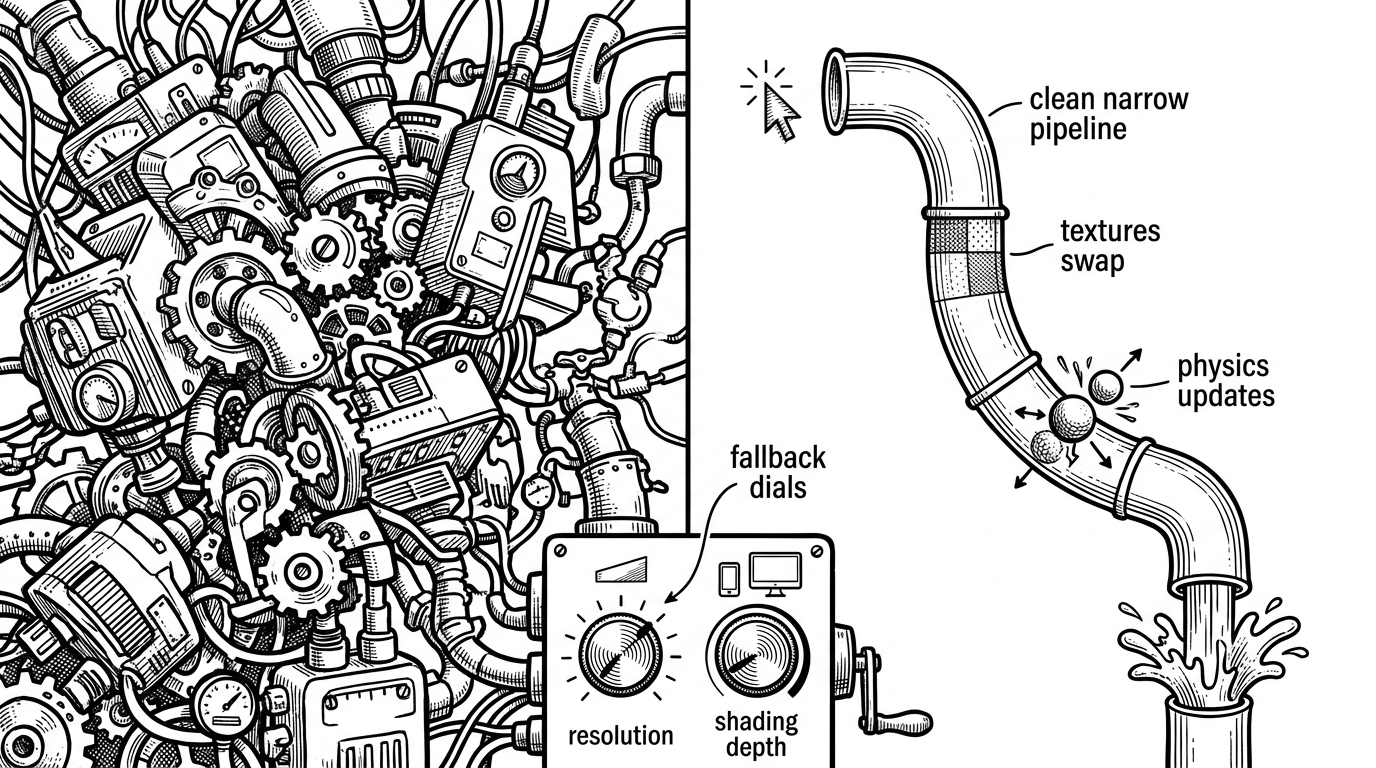
That tradeoff is the whole point. The repo wants a premium look, but it refuses to pay for that look with fragility. It makes the effect portable by treating performance as a first-class design input.
The Un-Library Pattern in the React Ecosystem
Splash-Cursor sits in a niche that keeps getting more attractive: advanced UI components that arrive as source, not as opaque dependencies. Compared with a general animation library or a creative coding framework, the repo is narrower, but it is also easier to own. For teams that want the effect and the code, that is a strong trade.
| Option | What you get | What you give up |
|---|---|---|
| CSS-only ripple | Tiny footprint and easy maintenance | Limited motion language and little physical realism |
| Anime.js | General-purpose animation control | You still have to build the effect architecture yourself |
| Three.js or p5.js | Massive expressive power | A bigger conceptual and runtime cost for a single UI flourish |
| Splash-Cursor | A reusable fluid simulation component | More implementation depth than a typical UI snippet |
The deeper signal is cultural. Front-end developers are increasingly comfortable adopting components that look experimental but ship with serious internals. That is the middle ground Splash-Cursor occupies. It is playful on the surface, but it is built like infrastructure.
What This Repo Signals About Front-End Craft
This repo is small, but it points to a bigger shift. Developers still want expressive interfaces, yet they want control, inspectability, and easy adoption more than they want a black-box package. Splash-Cursor answers that need with raw WebGL wrapped in a distribution model that feels modern instead of heavy.
That is why the project sticks in your head. It is a decorative cursor effect that reveals a serious engineering instinct underneath. The effect is the hook. The architecture is the argument.